Python Interfacing
In this tutorial we will work through creating a workflow for a
project called mango. The files will be added gradually as we
build up our understanding of SANE workflows.
We will be recreating the workflow created in the JSON Interface tutorial, however you do not need to go through that tutorial first.
Hint
SANE workflows tries to keep the python usage and JSON representation as as similar as possible. What you learn in one tutorial will translate smoothly to the other.
Additionally, the JSON and python interfaces can be used in tandem within workflows.
Preface
The python interface of SANE workflows offers a well documented API with type hints if your development environment supports it.
Starting within the python interface opens up a world of possibilities in complex workflow design, but we shall keep it simple for now until the later Writing Workflows topics.
Attention
Before we begin, it is important to understand that to get the
Orchestrator to interact with our python code, we should
use @sane.register decorator.
If you are unfamiliar with decorators, that is okay - it is not critically necessary to understand them make use of SANE.
Orchestrator
We should only use the the Orchestrator User Interface to interact with
the instance we are handed in by the @sane.register decorator.
The same advice of using the User Interface generally goes for all classes,
but especially the Orchestrator.
Hint
We only need @sane.register on the calls
that we want the Orchestrator to directly call. Any other
helper functions or classes we need can be written normally.
Let’s take a look at the @sane.register to see how to use it.
Quick Reference (click to open/close)
- @sane.register(f, priority=0)[source]
Adds a Python callable to the list of registered functions in
saneAny callable Python object which accepts
Orchestratoras the first positional argument may be registered. This is the primary way to havesanedirectly call Python code within a workflow. The aggregate list will then be invoked by anOrchestratorinstance.A priority can optionally be associated with this registration, corresponding to precedence in invocations. Priorities are handled in descending order, i.e. highest priority first. Equal priorities are evaluated in order of registration order.
See
Orchestrator.process_registered()for more info.The decorator may be called with no priority, in which case the default is
0.Example:
import sane

@sane.register
def last( orch ):
  # defaul priority is 0
  pass

@sane.register( priority=5 )
def second( orch )
  pass

@sane.register( 99 )
def first( orch ):
  pass
- Parameters:
f (Callable[[Orchestrator], None]) – Callable to register for future use when an
Orchestratorinstance loads the workflow. The calling instance will pass itself as the single positional argument to the registered callable.priority (int)
As we can see, our main interaction with SANE will be via functions
with this @sane.register syntax above the function itself, where
the function takes a single required positional argument (this will be
the Orchestrator)
import sane

@sane.register
def workflow( orch ):
  # hmmm.. what now..?
Hosts
To begin our workflow, let’s create the .sane/mango/hosts/forest.py
file and make a host in this file.
.sane/
└── mango
    └── hosts
        └── forest.py
We will start by creating a Host object and adding it to the Orchestrator.
.sane/mango/hosts/forest.pyimport sane
@sane.register
def create_forest_host( orch ):
forest = sane.Host( "forest" )
orch.add_host( forest )
Important
For objects to show up in the workflow you MUST add them to the
Orchestrator instance provided (orch). Otherwise,
your function will just create an object and “leave” it there doing
nothing after returning from the function call.
You can add to the orch at any time, before or after configuring
your Host or Action, but the object must
be added eventually. It is recommended to add your object just after
creation so that any internal logic (i.e. logging) can be setup immediately.
As far as creating a host we are basically done… Well, not really. It is a valid
host, but it does not provided much. Additionally, when running a workflow, the
expectation is that any Action will always run in an Environment,
even if one is not needed. Thus, hosts must provide at least one Environment
to even be somewhat useful.
Let’s continue to flesh out this Host.
If you click on the class name you will be taken to the API reference documentation,
or alternatively click this Host User Interface link to see the API
calls we care about. There are quite a few, so to start simple we will focus on
Host.add_resources() and Host.add_environment().
Resources & Environments
Take a quick look at the API documentation for Host.add_resources():
Quick Reference (click to open/close):
- Host.add_resources(resource_dict, override=False)[source]
Add resources to this provider that can be acquired
Hint
See
Resourcefor syntax on default supported valuesAdd a dict of key-value pairs to this provider. The key-value pairs in this dict will be used to create
AcquirableResourceinstances that track resource requests from aResourceRequestor.An example options
dict{ "cpus" : 12, "mem" : "1gb", "slots" : 2 }
The above
resource_dictwould provide 12 counts of"cpus", 1024 3bunits of"mem", and 2 counts of"slots".Important
The
ResourceProviderhas no inherent understanding of the units, amounts, or names of resources. Internally, resources will be tracked but at acquisition these resources will not correspond to any form of real hardware / software allocations or locks unless logic within a custom implementation of a derivedResourceProviderspecifies.- Parameters:
resource_dict (dict)
- class sane.resources.Resource[source]
A quantifiable positive integer resource
Resourceis a wrapper class on quatifiable values to facilitate common operations such as basic arithmetic, reduction to human-readable scaled units (in binary metric prefix, e.g. kibi, mebi, etc.), and type-checking operations between matching resource types or scalars.Resource.amountcan be set to anything that follows the following regular expression:(\d+)(k|m|g|t)?(b|w)?The first capture group (1st set of parenthesis) expects any number of numeric literals.The second capture group (2nd set of parenthesis) optionally can be a binary scaleThe third capture group (3rd set of parenthesis) optionally can be a unit (limited to ‘b’ or ‘w’ currently)Examples of valid and invalid resource amounts:
# valid
1
8k
512mb

# invalid
1.0
-2
7.6gw
All supported binary operations on a
Resourcereturn a newResourcewith the resultantamountexcept the division of two resources which results in anintvalue. The following operations are supported:res_a = sane.resource.Resource( "mem", "4gb" ) res_b = sane.resource.Resource( "mem", "2gb" ) # addition and subtraction res_a + res_b or res_a - res_b res_a + 12345 or res_a - 12345 # multiplication and division res_a * 2 or res_a / 2 res_a / res_b # Note: This results in an int and mult is not supported res_c = sane.resource.Resource( "cpus", 12 ) # Unsupported operations res_a + res_c # incompatible resouce type res_a + 1.2345 # float add/sub res_a - 1.2345 # float add/sub res_a * res_b # undefined behavior res_a - ( res_a * 2 ) # negative amount not allowed
Note
Resource.amountmust be an integer value, even if scaled. Thetotalorcurrentvalues will always be integer values, even if unscaled or multiplied/divided by afloatvalue.Scaling amounts:
prefix
multiplier
k1024
m1024 2
g1024 3
t1024 4
- classmethod __new__(*args, **kwargs)
We see that it takes a dict that uses sane.resources.Resource
syntax. The simple explanation is that the resource must be a non-negative integer
followed by optional binary scaling ( ‘k’ : 1024, ‘m’ : 1024 2, and so on), and
an optional unit designator.
The simple explanation is that the resource must be a non-negative integer followed by optional binary scaling ( ‘k’ : 1024, ‘m’ : 1024 2, and so on), and an optional unit designator.
So we have a forest Host and want to add resources for our mango
project workflow… Let’s add "trees" (these could nominally be "cpus"
or whatever resource your Action would take to run):
.sane/mango/hosts/forest.pyimport sane
@sane.register
def create_forest_host( orch ):
forest = sane.Host( "forest" )
orch.add_host( forest )
forest.add_resources( { "trees" : 12 } )
Next, we need an Environment to work with.
Important
Currently, actions ALWAYS need to run with an Environment set up.
Therefore, hosts must have at least one Environment declared
that isn’t the base_env
If we look at the Environment User Interface we can see what function
calls are available to use.
Quick Reference (click to open/close)
- Host.add_environment(env)[source]
Add an
Environmentto theenvironmentsusingEnvironment.nameas the key- Parameters:
env (Environment)
- Environment.setup_env_vars(cmd, var, val=None, category='unassigned')[source]
Store environment variable commands to execute later during
setup()These commands will eventually be executed within the isolated subprocess of
Action.run(). Thecmdshould be one of {"set","unset","prepend","append"}. Thevalis used for all eventual calls except"unset". Thecmdcorresponds to a respective call used insetup()Example usage for recreating
export LD_LIBRARY_PATH=$LD_LIBRARY_PATH:/new/path/:self.setup_env_vars( "append", "LD_LIBRARY_PATH", "/new/path/" )
Warning
os.environ uses values verbatim and does not expand values.
setup_env_vars( "append", "LD_LIBRARY_PATH", "$NEW_PATH" )withNEW_PATH=/new/pathwould not produce the intended effect. Currently, theenv_var_*methods do not expand values automatically.If a
categoryis passed in, commands are grouped based on thecategoryand during evaluation are executed in order ofcategorycreation then command insertion order (firstcategoryand first command input go first).
For demonstrative purposes, we will say that our environments have different
GROWTH_RATE values can be used within the workflow.
Once again, keeping things simple, we will focus only on the necessary functions
to get this workflow going. We will be using the Environment.setup_env_vars()
method, then after Host.add_environment().
Our final file setup should look something like so:
.sane/mango/hosts/forest.pyimport sane
@sane.register
def create_forest_host( orch ):
forest = sane.Host( "forest" )
orch.add_host( forest )
forest.add_resources( { "trees" : 12 } )
valley = sane.Environment( "valley" )
river = sane.Environment( "river" )
valley.setup_env_vars( "set", "GROWTH_RATE", 85 )
river.setup_env_vars( "set", "GROWTH_RATE", 65 )
forest.add_environment( valley )
forest.add_environment( river )
We now have a functional host. However, it can’t do a whole lot without an Action
to exercise the host and its environments. If we were to run this host, we would
get some lackluster output:
sane_runner -p .sane/ --run

2025-12-07 20:36:10 INFO     [sane_runner]            Logging output to /home/aislas/mango/log/runner.log
2025-12-07 20:36:10 INFO     [orchestrator]           Searching for workflow files...
2025-12-07 20:36:10 INFO     [orchestrator]             Searching .sane/ for *.json
2025-12-07 20:36:10 INFO     [orchestrator]             Searching .sane/ for *.jsonc
2025-12-07 20:36:10 INFO     [orchestrator]             Searching .sane/ for *.py
2025-12-07 20:36:10 INFO     [orchestrator]               Found .sane/mango/hosts/forest.py
2025-12-07 20:36:10 INFO     [orchestrator]           Loading python file .sane/mango/hosts/forest.py as 'mango.hosts.forest'
2025-12-07 20:36:10 INFO     [sane_runner]            No actions selected
...help info...
Tip
This output can be reproduced by using the source repo example found at
/home/aislas/frameflow/docs/examples/mango/python_basic_host/.sane
The default search patterns found our file and loaded it, but nothing was done since no actions were found.
Actions
Let’s now try to create our first python-based Action!
We will create the .sane/mango/actions/grow.py file, as well as create a helper
script at .sane/mango/scripts/grow.sh:
.sane/
└── mango
    ├── actions
    │   └── grow.py
    ├── hosts
    │   └── forest.py
    └── scripts
        └── grow.sh
We will start by creating our .sane/mango/actions/grow.py file:
.sane/mango/actions/grow.pyimport sane
@sane.register
def create_grow_action( orch ):
grow = sane.Action( "grow_action" )
orch.add_action( grow )
#...
Similar to the Host creation, take a look at the Action
User Interface to get an idea of the API available to use. Most important
to us will be:
config(config["command"]andconfig["arguments"]since we are using the defaultAction.run())
We shall go over the relevance of each of these.
config
Arguably the most versatile field in the default Action, this generic
dict is meant to hold anything picklable that your action may need in running.
Later (during Attribute Dereferencing) we will learn to more effectively use
this general data container.
For now, the main use is in the config["command"] and config["arguments"]
keys which are used by the default Action.run(). As their names imply,
during Action execution, the config["command"] and config["arguments"]
will be used as the command and arguments to execute for that action, respectively.
We are going to use the helper script located at .sane/mango/scripts.grow.sh to
perform our main logic. This thereby allows us to have an Action with
customizable execution without needing to write Custom Actions. The
path we use to the script should be a relative path from the working directory, in
this case ./. Only use absolute paths for scripts that will always be in the
same place (e.g. host scripts)!
Let’s quickly modify our .sane/mango/actions/grow.py:
.sane/mango/actions/grow.pyimport sane
@sane.register
def create_grow_action( orch ):
grow = sane.Action( "grow_action" )
orch.add_action( grow )
grow.config["command"] = ".sane/mango/scripts/grow.sh"
grow.config["arguments"] = [ 4 ] # this must be a list
As for the contents of .sane/mango/scripts/grow.sh let’s use:
.sane/mango/scripts/grow.sh#!/usr/bin/bash
NTREES=$1
echo "Growing with $NTREES trees with $GROWTH_RATE% growth rate..."
for i in $(seq 1 $NTREES ); do
NMANGOS=$(( ($RANDOM % 10) * $GROWTH_RATE / 100 + 1 ))
echo " Tree $i grew $NMANGOS mangos!"
echo $NMANGOS > mango_tree_$i.txt
done
Note
The string provided to config["command"] must be an executable. Commands
from your PATH will work, but if you use a script it must have the
executable property. Try running:
chmod +x <command script>
if you are having issues getting your Action to run your config["command"]
environment
Each Action must run within an Environment, however the
actual object instance is owned by the Host, as each host is left to
implement that specific environment.
The communication from Action to Host about which
environment to use is facilitated by a str match between Action.environment
and Environment.name (or Environment.aliases) within the
Host.environments.
Let’s update our .sane/mango/actions/grow.py again, saying we need a "valley"
environment (recall forest.py):
.sane/mango/actions/grow.pyimport sane
@sane.register
def create_grow_action( orch ):
grow = sane.Action( "grow_action" )
orch.add_action( grow )
grow.config["command"] = ".sane/mango/scripts/grow.sh"
grow.config["arguments"] = [ 4 ] # this must be a list
grow.environment = "valley"
add_resource_requirements()
Quick Reference (click to open/close)
- Action.add_resource_requirements(resource_dict)[source]
Add resource requirements to this requestor
Hint
See
Resourcefor syntax on default supported valuesAdd an arbitrary dict of key-value pairs to this requestor. The key-value pairs in this dict will eventually be requested from a
ResourceRequestorfor:If the value in a key-value pair is of type
dict, it will be considered an override resource request specific to the name of the key. This overridedictwill be kept separately in an internal location to be used later. Multiple nesteddictoverrides are not allowed.See
resources()for more info.As an example:
{
  "cpus"  : 12,
  "mem"   : "1gb",
  "slots" : 1
  "specific_provider" :
  {
    "cpus" : 36,
    "mem"  : "3gb"
  }
}
The values of
"specific_provider"will only be used (in addition to any unmodified values in the top-level dict) if thecurrent_hostmatches this key.Note
While the
resource_dictcan be arbitrary values, it is on theResourceProvider(i.e.sane.Host) to be able to provide these resources.Notably, any resources that do not follow the
Resourcesyntax are left strictly to the provider class implementation. The default classes do not support values outside ofResourceunless specified.- Parameters:
resource_dict (dict)
Any Action that makes use of quantifiable resources tracked by
Host.resources should ideally note them by calling this function.
These resource requests are how the Orchestrator coordinates tasking
with a given Host. This is to ensure the resources that the host does
provide are not oversubscribed (keeping usage at or below limit), and that any
Action that requires resources that are not provided are caught.
Danger
If an Action does not request resources, regardless
of the internal logic and actual resources usage, it will ALWAYS
be run. If you use untracked or more resources than requested, you may
inadvertently use more resources than the Host provides.
It is generally a good idea to track critical resources needed in both
the Action and Host
To grow our mangos we will need "trees" (recall forest.py):
.sane/mango/actions/grow.pyimport sane
@sane.register
def create_grow_action( orch ):
grow = sane.Action( "grow_action" )
orch.add_action( grow )
grow.config["command"] = ".sane/mango/scripts/grow.sh"
grow.config["arguments"] = [ 4 ] # this must be a list
grow.environment = "valley"
grow.add_resource_requirements( { "trees" : 4 } )
add_dependencies()
This is the first Action in our workflow, so it will not have any
dependencies. See the Adding Action.dependencies for details on adding dependencies.
Final Action Result
Our final .sane/mango/actions/grow.py should now look like:
.sane/mango/actions/grow.pyimport sane
@sane.register
def create_grow_action( orch ):
grow = sane.Action( "grow_action" )
orch.add_action( grow )
grow.config["command"] = ".sane/mango/scripts/grow.sh"
grow.config["arguments"] = [ 4 ] # this must be a list
grow.environment = "valley"
grow.add_resource_requirements( { "trees" : 4 } )
Running
Now that we have everything set up, we should be able to run. We will be using the following optional flags:
-shSpecific Host option to ensure our host is selected-nNew Run option to always rerun our workflow entirely-vVerbose option to get full output in one location rather than split amongst multiple files
sane_runner -p .sane/ -sh forest -n -v -r

2025-12-10 18:41:08 INFO     [sane_runner]            Logging output to /home/aislas/mango/log/runner.log
2025-12-10 18:41:08 INFO     [orchestrator]           Searching for workflow files...
2025-12-10 18:41:08 INFO     [orchestrator]             Searching .sane/ for *.json
2025-12-10 18:41:08 INFO     [orchestrator]             Searching .sane/ for *.jsonc
2025-12-10 18:41:08 INFO     [orchestrator]             Searching .sane/ for *.py
2025-12-10 18:41:08 INFO     [orchestrator]               Found .sane/mango/hosts/forest.py
2025-12-10 18:41:08 INFO     [orchestrator]               Found .sane/mango/actions/grow.py
2025-12-10 18:41:08 INFO     [orchestrator]           Loading python file .sane/mango/hosts/forest.py as 'mango.hosts.forest'
2025-12-10 18:41:08 INFO     [orchestrator]           Loading python file .sane/mango/actions/grow.py as 'mango.actions.grow'
2025-12-10 18:41:08 INFO     [orchestrator]           No previous save file to load
2025-12-10 18:41:08 INFO     [orchestrator]           Requested actions:
2025-12-10 18:41:08 INFO     [orchestrator]             grow_action
2025-12-10 18:41:08 INFO     [orchestrator]           and any necessary dependencies
2025-12-10 18:41:08 INFO     [orchestrator]           Full action set:
2025-12-10 18:41:08 INFO     [orchestrator]           Full action set:
2025-12-10 18:41:08 INFO     [orchestrator]             grow_action
2025-12-10 18:41:08 INFO     [orchestrator]           Checking host "forest"
2025-12-10 18:41:08 INFO     [orchestrator]           Running as 'forest'
2025-12-10 18:41:08 INFO     [orchestrator]           Checking ability to run all actions on 'forest'...
2025-12-10 18:41:08 INFO     [orchestrator]             Checking environments...
2025-12-10 18:41:08 INFO     [orchestrator]             Checking resource availability...
2025-12-10 18:41:08 INFO     [orchestrator]           * * * * * * * * * * * * * * * * * * * * * * * * * * * * * * * * * * * * * * * * * * * * * * * * * *
2025-12-10 18:41:08 INFO     [orchestrator]           * * * * * * * * * *            All prerun checks for 'forest' passed            * * * * * * * * * *
2025-12-10 18:41:08 INFO     [orchestrator]           * * * * * * * * * * * * * * * * * * * * * * * * * * * * * * * * * * * * * * * * * * * * * * * * * *
2025-12-10 18:41:08 INFO     [orchestrator]           Saving host information...
2025-12-10 18:41:08 INFO     [orchestrator]           Setting state of all inactive actions to pending
2025-12-10 18:41:08 INFO     [orchestrator]           No previous save file to load
2025-12-10 18:41:08 INFO     [orchestrator]           Using working directory : '/home/aislas/mango'
2025-12-10 18:41:08 INFO     [orchestrator]           Running actions...
2025-12-10 18:41:08 INFO     [orchestrator]           Running 'grow_action' on 'forest'
2025-12-10 18:41:08 INFO     [thread_0]  [grow_action::launch]      Action logfile captured at /home/aislas/mango/log/grow_action.log
2025-12-10 18:41:08 INFO     [thread_0]  [grow_action::launch]      Saving action information for launch...
2025-12-10 18:41:08 INFO     [thread_0]  [grow_action::launch]      Using working directory : '/home/aislas/mango'
2025-12-10 18:41:08 INFO     [thread_0]  [grow_action::launch]      Running command:
2025-12-10 18:41:08 INFO     [thread_0]  [grow_action::launch]        /home/aislas/frameflow/sane/action_launcher.py /home/aislas/mango /home/aislas/mango/tmp/action_grow_action.json
2025-12-10 18:41:08 INFO     [thread_0]  [grow_action::launch]      Command output will be captured to logfile /home/aislas/mango/log/grow_action.runlog
2025-12-10 18:41:08 INFO     [thread_0]  [grow_action::launch]      Command output will be printed to this terminal
2025-12-10 18:41:08 INFO     [grow_action::launch]    ***************Inside action_launcher.py***************
2025-12-10 18:41:08 INFO     [grow_action::launch]    Current directory: /home/aislas/mango
2025-12-10 18:41:08 INFO     [grow_action::launch]    Loaded Action "grow_action"
2025-12-10 18:41:08 INFO     [grow_action::launch]    Loaded Host "forest"
2025-12-10 18:41:08 INFO     [grow_action::launch]    Using Environment "valley"
2025-12-10 18:41:08 INFO     [valley]                 Running env cmd: 'set' with var: 'GROWTH_RATE' and val: '85'
2025-12-10 18:41:08 INFO     [valley]                   Environment variable GROWTH_RATE=85
2025-12-10 18:41:08 INFO     [grow_action::run]       Running command:
2025-12-10 18:41:08 INFO     [grow_action::run]         .sane/mango/scripts/grow.sh 4
2025-12-10 18:41:08 INFO     [grow_action::run]       Command output will be printed to this terminal
2025-12-10 18:41:08 STDOUT   [grow_action::run]       Growing with 4 trees with 85% growth rate...
2025-12-10 18:41:08 STDOUT   [grow_action::run]         Tree 1 grew 6 mangos!
2025-12-10 18:41:08 STDOUT   [grow_action::run]         Tree 2 grew 6 mangos!
2025-12-10 18:41:08 STDOUT   [grow_action::run]         Tree 3 grew 4 mangos!
2025-12-10 18:41:08 STDOUT   [grow_action::run]         Tree 4 grew 6 mangos!
2025-12-10 18:41:08 INFO     [grow_action::launch]    ***************Finished action_launcher.py***************
2025-12-10 18:41:08 INFO     [orchestrator]           [FINISHED] ** Action 'grow_action'            completed with 'success'
2025-12-10 18:41:08 INFO     [orchestrator]           Finished running queued actions
2025-12-10 18:41:08 INFO     [orchestrator]             grow_action: success
2025-12-10 18:41:08 INFO     [orchestrator]           All actions finished with success
2025-12-10 18:41:08 INFO     [orchestrator]           Finished in 0:00:00.183791
2025-12-10 18:41:08 INFO     [orchestrator]           Logfiles at /home/aislas/mango/log
2025-12-10 18:41:08 INFO     [orchestrator]           Save file at /home/aislas/mango/tmp/orchestrator.json
2025-12-10 18:41:08 INFO     [orchestrator]           JUnit file at /home/aislas/mango/log/results.xml
2025-12-10 18:41:08 INFO     [sane_runner]            Finished
Tip
This output can be reproduced by using the source repo example found at
docs/examples/mango/python_grow_action/.sane/
A quick walkthrough of the above output, focusing on the highlighted regions:
The
Orchestratorfinds and loads our python filesThe
Orchestrator, after verifying the selectedHost, runs ourActionon the host- During execution inside our
Action(action_launcher.py): Sets up the
EnvironmentCalls our
config["command"]withconfig["arguments"]Outputs the command output with log tag
STDOUT(stderr also goes here)
- During execution inside our
Final logs and results information is left at the bottom for our convenience
Special notes:
Everything betwwen
***...Inside action_launcher.py...***and***...Finished action_launcher.py...***for a respectiveActionis actually the direct output of theAction.run()(3.a) occurs because the
action_launcher.py(Action.run()) occurs in a totally separate subprocess(3.d) captures all command output (stdout and stderr)
Extending the workflow
Now that we have a basis for creating our workflow, let’s harvest our mangos.
We will be adding a .sane/mango/actions/harvest.py file and supporting
.sane/mango/scripts/harvest.sh script:
.sane/
└── mango
    ├── actions
    │   ├── grow.py
    │   └── harvest.py
    ├── hosts
    │   └── forest.py
    └── scripts
        ├── grow.sh
        └── harvest.sh
Adding Action.dependencies
Quick Reference (click to open/close)
- Action.add_dependencies(*args)[source]
Add dependencies to this
ActionUse this function to properly add dependencies at any time before the workflow is run. This can be called before or after Actions are added to the workflow, but not after the workflow has started running. No checks for valid graph topology, dependency existing, and so on are performed. These checks are done by the
Orchestrator(seeOrchestrator.construct_dag())Any number of dependencies may be listed as either :
(a) a single
strcorresponding to the dependencyid(b) tuple pair of
str(dependencyid) andstrrepresentation ofDependencyTypeDependencyTypevalue
Note
If no
DependencyTypeis provided, i.e. calling in manner (a), then the default isDependencyType.AFTEROKThe following code block shows a few valid example calls:
import sane

@sane.register
def register_actions( orch ):
  a = sane.Action( "a" )
  b = sane.Action( "bee" )
  c = sane.Action( "c" )

  orch.add_action( a )
  # The provided ID string MUST match the Action.id, not the object variable name
  #                    vvv
  a.add_dependencies( "bee", ( "c", "afterok" ) )
  b.add_dependencies( ( "c", sane.DependencyType.AFTEROK ) )
  # This is a valid call but does not form a valid DAG
  c.add_dependencies( "a" )
Before we create a new Action for our workflow, we should first discuss
how it will tie in and depend on our "grow_action".
When running multiple Action in a workflow, it may be beneficial to
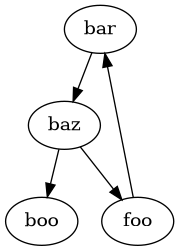
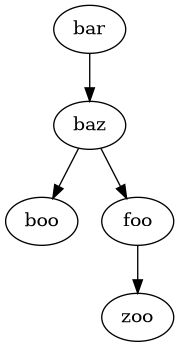
have them run in a very particular order. This is where the directed acyclic
graph (DAG) nature of SANE workflows comes into play.
Dependencies between Action are mapped out based on \(child \rightarrow N parents\)
relationships, where each Action lists the parents it is dependent on.
Action can have any number of dependencies, so long
as the dependencies never form a closed loop. In other words, an Action
CAN NEVER be the ancestor (parent) to any of its own ancestors. If thought of
as a family tree, any single Action CAN NEVER reappear earlier in
its lineage.
BAD: Dependency Graph with cycles
OKAY: Dependency Graph with no cycles
This is the first Action in our workflow, so it will not have any
dependencies.
If we were to add depedencies to an Action, we could do it in one of
three ways, using DependencyType:
Quick Reference (click to open/close)
- class sane.DependencyType[source]
Types of dependencies between actions from child to parent
- AFTEROK = 'afterok'
after successful run (this is the default)
- AFTERNOTOK = 'afternotok'
after failure
- AFTERANY = 'afterany'
after either failure or success
- AFTER = 'after'
after the step starts
Assuming the following functional basis:
import sane

@sane.register
def foo( orch )
  a = sane.Action( "a" )
  b = sane.Action( "b" )
  c = sane.Action( "c" )
  d = sane.Action( "d" )
  orch.add_action( a )
  orch.add_action( b )
  orch.add_action( c )
  orch.add_action( d )
- This method relies on default assignment of
DependencyType.AFTEROK: - This method relies on the string values of
DependencyType: - This method relies on the enum values of
DependencyType: - Example Python dependency using (
Action.id:DependencyType) tuple# ...python file excerpt... b.add_dependencies( ( "a", sane.DependencyType.AFTEROK ) ) d.add_dependencies( ( "b", sane.DependencyType.AFTEROK ), ( "c", sane.DependencyType.AFTERNOTOK ) )
These methods are intermixable, even with the same call:
Example Python dependency using all methods# ...python file excerpt... b.add_dependencies( "a" ) d.add_dependencies( "a", ( "b", "afternotok" ), ( "c", sane.DependencyType.AFTERNOTOK ) )
New files
We can model the new "harvest_action" after the grow.py example, but change a few things
such as the script we will run and adding a dependency to our initial "grow_action":
.sane/mango/actions/harvest.pyimport sane
@sane.register
def create_harvest_action( orch ):
harvest = sane.Action( "harvest_action" )
orch.add_action( harvest )
harvest.config["command"] = ".sane/mango/scripts/harvest.sh"
harvest.environment = "valley"
# no resource requirements listed for this action
# set dependency to "grow_action" without having access
# to the sane.Action( "grow_action" ) object itself
harvest.add_dependencies( "grow_action" )
And our helper script as:
.sane/mango/scripts/harvest.sh#!/usr/bin/bash
echo "Harvesting mangos..."
echo -ne "Collected : "
awk 'BEGIN { sum=0 } { sum+=$1 } END { print sum }' mango_tree_*.txt
Note that we listed the dependencies using the Action.id string value,
and not the Action object created in grow.py directly.
Since the dependency graph is constructed at runtime, there are NO checks on
dependency graph validity during Action instantiation. Checks are
done ony after all Action are loaded and attempted to be run.
This slight caveat gives us the flexibilty to declare our Action objects
across different files and functions in virtually any order we want. We can create
workflows without worrying about when an Action is created,
and instead focus on proper dependency mapping as the final result.
Let’s run with new action:
sane_runner -p .sane/ -sh forest -n -v -r

2025-12-11 16:36:33 INFO     [sane_runner]            Logging output to /home/aislas/mango/log/runner.log
2025-12-11 16:36:33 INFO     [orchestrator]           Searching for workflow files...
2025-12-11 16:36:33 INFO     [orchestrator]             Searching .sane/ for *.json
2025-12-11 16:36:33 INFO     [orchestrator]             Searching .sane/ for *.jsonc
2025-12-11 16:36:33 INFO     [orchestrator]             Searching .sane/ for *.py
2025-12-11 16:36:33 INFO     [orchestrator]               Found .sane/mango/actions/grow.py
2025-12-11 16:36:33 INFO     [orchestrator]               Found .sane/mango/actions/harvest.py
2025-12-11 16:36:33 INFO     [orchestrator]               Found .sane/mango/hosts/forest.py
2025-12-11 16:36:33 INFO     [orchestrator]           Loading python file .sane/mango/actions/grow.py as 'mango.actions.grow'
2025-12-11 16:36:33 INFO     [orchestrator]           Loading python file .sane/mango/actions/harvest.py as 'mango.actions.harvest'
2025-12-11 16:36:33 INFO     [orchestrator]           Loading python file .sane/mango/hosts/forest.py as 'mango.hosts.forest'
2025-12-11 16:36:33 INFO     [orchestrator]           No previous save file to load
2025-12-11 16:36:33 INFO     [orchestrator]           Requested actions:
2025-12-11 16:36:33 INFO     [orchestrator]             grow_action     harvest_action
2025-12-11 16:36:33 INFO     [orchestrator]           and any necessary dependencies
2025-12-11 16:36:33 INFO     [orchestrator]           Full action set:
2025-12-11 16:36:33 INFO     [orchestrator]           Full action set:
2025-12-11 16:36:33 INFO     [orchestrator]             grow_action     harvest_action
2025-12-11 16:36:33 INFO     [orchestrator]           Checking host "forest"
2025-12-11 16:36:33 INFO     [orchestrator]           Running as 'forest'
2025-12-11 16:36:33 INFO     [orchestrator]           Checking ability to run all actions on 'forest'...
2025-12-11 16:36:33 INFO     [orchestrator]             Checking environments...
2025-12-11 16:36:33 INFO     [orchestrator]             Checking resource availability...
2025-12-11 16:36:33 INFO     [orchestrator]           * * * * * * * * * * * * * * * * * * * * * * * * * * * * * * * * * * * * * * * * * * * * * * * * * *
2025-12-11 16:36:33 INFO     [orchestrator]           * * * * * * * * * *            All prerun checks for 'forest' passed            * * * * * * * * * *
2025-12-11 16:36:33 INFO     [orchestrator]           * * * * * * * * * * * * * * * * * * * * * * * * * * * * * * * * * * * * * * * * * * * * * * * * * *
2025-12-11 16:36:33 INFO     [orchestrator]           Saving host information...
2025-12-11 16:36:33 INFO     [orchestrator]           Setting state of all inactive actions to pending
2025-12-11 16:36:33 INFO     [orchestrator]           No previous save file to load
2025-12-11 16:36:33 INFO     [orchestrator]           Using working directory : '/home/aislas/mango'
2025-12-11 16:36:33 INFO     [orchestrator]           Running actions...
2025-12-11 16:36:33 INFO     [orchestrator]           Running 'grow_action' on 'forest'
2025-12-11 16:36:33 INFO     [thread_0]  [grow_action::launch]         Action logfile captured at /home/aislas/mango/log/grow_action.log
2025-12-11 16:36:33 INFO     [thread_0]  [grow_action::launch]         Saving action information for launch...
2025-12-11 16:36:33 INFO     [thread_0]  [grow_action::launch]         Using working directory : '/home/aislas/mango'
2025-12-11 16:36:33 INFO     [thread_0]  [grow_action::launch]         Running command:
2025-12-11 16:36:33 INFO     [thread_0]  [grow_action::launch]           /home/aislas/frameflow/sane/action_launcher.py /home/aislas/mango /home/aislas/mango/tmp/action_grow_action.json
2025-12-11 16:36:33 INFO     [thread_0]  [grow_action::launch]         Command output will be captured to logfile /home/aislas/mango/log/grow_action.runlog
2025-12-11 16:36:33 INFO     [thread_0]  [grow_action::launch]         Command output will be printed to this terminal
2025-12-11 16:36:33 INFO     [grow_action::launch]    ***************Inside action_launcher.py***************
2025-12-11 16:36:33 INFO     [grow_action::launch]    Current directory: /home/aislas/mango
2025-12-11 16:36:33 INFO     [grow_action::launch]    Loaded Action "grow_action"
2025-12-11 16:36:33 INFO     [grow_action::launch]    Loaded Host "forest"
2025-12-11 16:36:33 INFO     [grow_action::launch]    Using Environment "valley"
2025-12-11 16:36:33 INFO     [valley]                 Running env cmd: 'set' with var: 'GROWTH_RATE' and val: '85'
2025-12-11 16:36:33 INFO     [valley]                   Environment variable GROWTH_RATE=85
2025-12-11 16:36:33 INFO     [grow_action::run]       Running command:
2025-12-11 16:36:33 INFO     [grow_action::run]         .sane/mango/scripts/grow.sh 4
2025-12-11 16:36:33 INFO     [grow_action::run]       Command output will be printed to this terminal
2025-12-11 16:36:33 STDOUT   [grow_action::run]       Growing with 4 trees with 85% growth rate...
2025-12-11 16:36:33 STDOUT   [grow_action::run]         Tree 1 grew 2 mangos!
2025-12-11 16:36:33 STDOUT   [grow_action::run]         Tree 2 grew 4 mangos!
2025-12-11 16:36:33 STDOUT   [grow_action::run]         Tree 3 grew 2 mangos!
2025-12-11 16:36:33 STDOUT   [grow_action::run]         Tree 4 grew 8 mangos!
2025-12-11 16:36:33 INFO     [grow_action::launch]    ***************Finished action_launcher.py***************
2025-12-11 16:36:33 INFO     [orchestrator]           [FINISHED] ** Action 'grow_action'            completed with 'success'
2025-12-11 16:36:33 INFO     [orchestrator]           Running 'harvest_action' on 'forest'
2025-12-11 16:36:33 INFO     [thread_0]  [harvest_action::launch]      Action logfile captured at /home/aislas/mango/log/harvest_action.log
2025-12-11 16:36:33 INFO     [thread_0]  [harvest_action::launch]      Saving action information for launch...
2025-12-11 16:36:33 INFO     [thread_0]  [harvest_action::launch]      Using working directory : '/home/aislas/mango'
2025-12-11 16:36:33 INFO     [thread_0]  [harvest_action::launch]      Running command:
2025-12-11 16:36:33 INFO     [thread_0]  [harvest_action::launch]        /home/aislas/frameflow/sane/action_launcher.py /home/aislas/mango /home/aislas/mango/tmp/action_harvest_action.json
2025-12-11 16:36:33 INFO     [thread_0]  [harvest_action::launch]      Command output will be captured to logfile /home/aislas/mango/log/harvest_action.runlog
2025-12-11 16:36:33 INFO     [thread_0]  [harvest_action::launch]      Command output will be printed to this terminal
2025-12-11 16:36:33 INFO     [harvest_action::launch] ***************Inside action_launcher.py***************
2025-12-11 16:36:33 INFO     [harvest_action::launch] Current directory: /home/aislas/mango
2025-12-11 16:36:33 INFO     [harvest_action::launch] Loaded Action "harvest_action"
2025-12-11 16:36:33 INFO     [harvest_action::launch] Loaded Host "forest"
2025-12-11 16:36:33 INFO     [harvest_action::launch] Using Environment "valley"
2025-12-11 16:36:33 INFO     [valley]                 Running env cmd: 'set' with var: 'GROWTH_RATE' and val: '85'
2025-12-11 16:36:33 INFO     [valley]                   Environment variable GROWTH_RATE=85
2025-12-11 16:36:33 INFO     [harvest_action::run]    Running command:
2025-12-11 16:36:33 INFO     [harvest_action::run]      .sane/mango/scripts/harvest.sh
2025-12-11 16:36:33 INFO     [harvest_action::run]    Command output will be printed to this terminal
2025-12-11 16:36:33 STDOUT   [harvest_action::run]    Harvesting mangos...
2025-12-11 16:36:33 STDOUT   [harvest_action::run]    Collected : 16
2025-12-11 16:36:33 INFO     [harvest_action::launch] ***************Finished action_launcher.py***************
2025-12-11 16:36:33 INFO     [orchestrator]           [FINISHED] ** Action 'harvest_action'         completed with 'success'
2025-12-11 16:36:33 INFO     [orchestrator]           Finished running queued actions
2025-12-11 16:36:33 INFO     [orchestrator]             grow_action   : success  harvest_action: success
2025-12-11 16:36:33 INFO     [orchestrator]           All actions finished with success
2025-12-11 16:36:33 INFO     [orchestrator]           Finished in 0:00:00.346601
2025-12-11 16:36:33 INFO     [orchestrator]           Logfiles at /home/aislas/mango/log
2025-12-11 16:36:33 INFO     [orchestrator]           Save file at /home/aislas/mango/tmp/orchestrator.json
2025-12-11 16:36:33 INFO     [orchestrator]           JUnit file at /home/aislas/mango/log/results.xml
2025-12-11 16:36:33 INFO     [sane_runner]            Finished
Tip
This output can be reproduced by using the source repo example found at
docs/examples/mango/python_harvest_action/.sane/
Again, reviewing the highlighted regions:
Our
"harvest_action"is only executed after the"grow_action"has completedThe
config["command"]is executed (this time with noconfig["arguments"])The
STDOUTshows that we harvested16mangos. Quite the haul!
✨ Congratulations! ✨
You’ve gone through the basic python interface tutorial and are ready to make some workflows!
If you’re looking to add more control to your workflows or for an extra challenge, check out the Writing Workflows.